
Your system, explained.
A native dashboard designed exclusively for macOS that turns cryptic terminal output into clear, visual insights — your network, processes, and storage, all in one place, explained in plain English.
Like Activity Monitor, but one that actually explains what's going on.
Public alpha · macOS 12+ · Apple-signed · Universal (Apple Silicon & Intel) · Free
Why Sysplained?
Activity Monitor shows you numbers. Terminal shows you walls of text. Sysplained shows you what it all means.
$ ifconfig en0
en0: flags=8863<UP,BROADCAST,SMART,RUNNING>
	inet 192.168.1.42 netmask 0xffffff00
	inet6 fe80::1c4a:3f2e:8b91::1%en0
	ether a8:60:b6:2e:f4:c2
	media: autoselect
	status: active

$ netstat -an | grep ESTABLISHED
tcp4  0  0  192.168.1.42.443    52.84.12.7.443     ESTABLISHED
tcp4  0  0  192.168.1.42.55321  140.82.114.3.443   ESTABLISHED
tcp4  0  0  192.168.1.42.55419  185.199.108.4.443  ESTABLISHED
...87 more lines

$ lsof -i -P -n | grep LISTEN
rapportd    408 user    4u IPv4 0xf28a TCP *:49152 (LISTEN)
ControlCe   423 user    7u IPv4 0xf29c TCP *:7000 (LISTEN)
Spotify    1204 user   70u IPv4 0xfa12 TCP *:57621 (LISTEN)

$ arp -a
? (192.168.1.1) at 00:1a:2b:3c:4d:5e on en0
? (192.168.1.100) at ff:ff:ff:ff:ff:ff on en0
Multiple commands, scattered windows, raw text output.
One dashboard, sortable tables, live charts, real-time updates.
12 Views, One Dashboard
A friendly visual GUI for the macOS commands you'd otherwise run in Terminal — ifconfig, netstat, lsof, dig, traceroute and more — with DNS, ports, routing and system tools organized in a single sidebar.
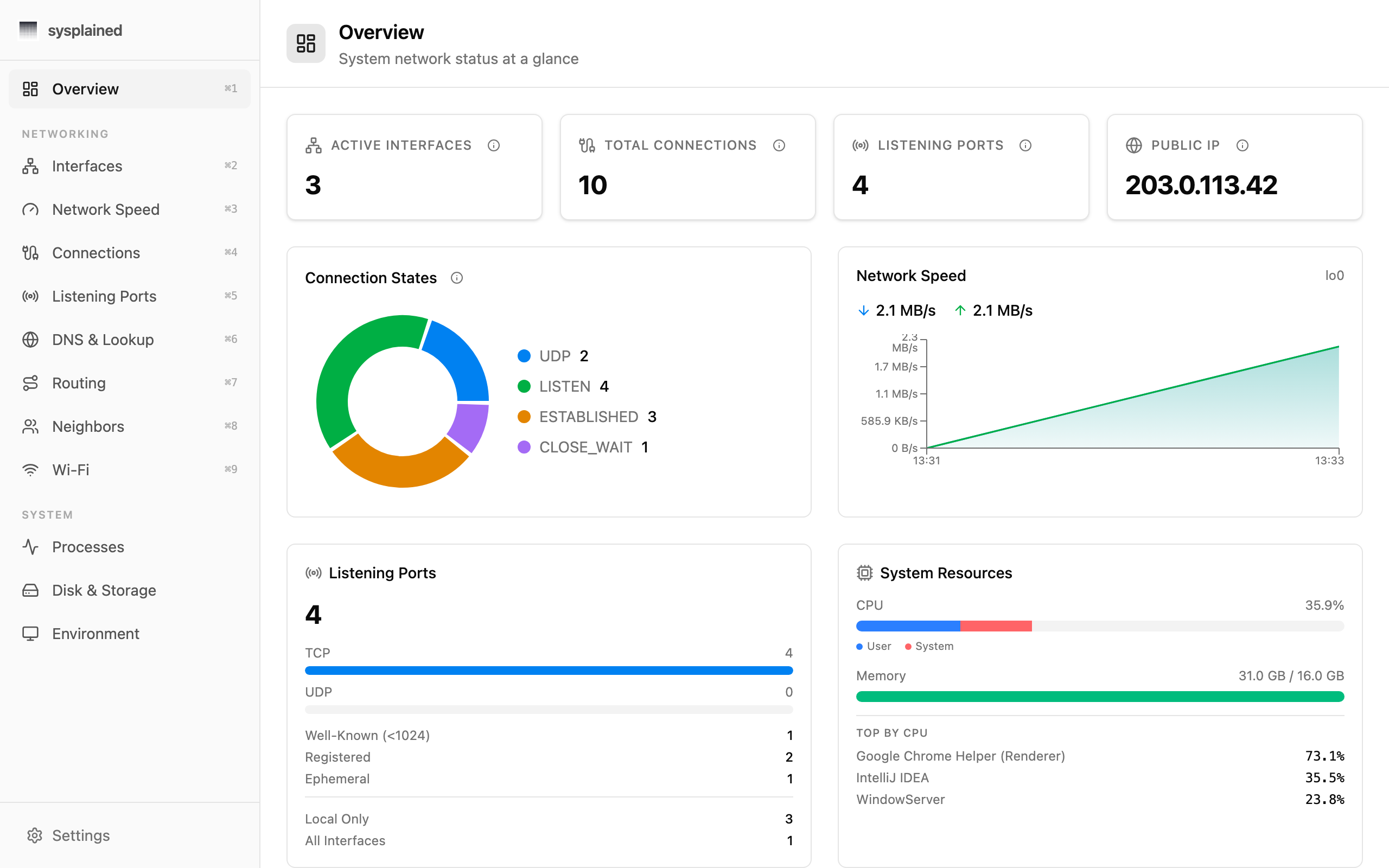
Overview
System network status at a glance with stat cards, connection charts, and live speed graphs.
Interfaces
Expandable interface cards with IPv4/IPv6, MAC address, MTU, status, and TX/RX counters.
Network Speed
Live bandwidth monitoring with per-interface download/upload speed graphs and peak stats.
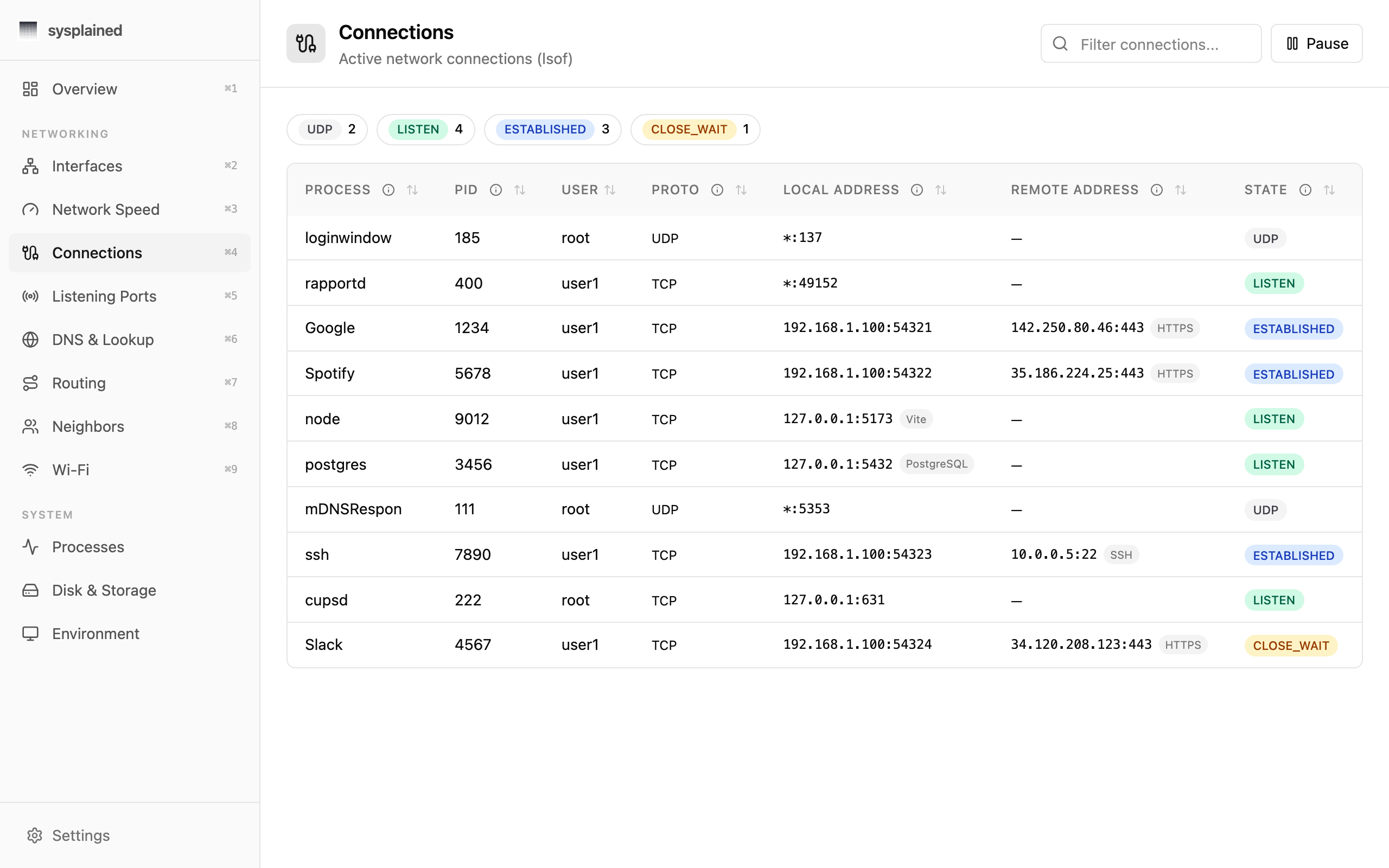
Connections
Filterable, sortable table of all active connections with protocol, state, and process info.
Listening Ports
Port table with exposure badges, well-known port labels, and process identification.
DNS & Lookup
Interactive DNS lookup with record type selector, results table, and query history.
Routing
Routing table with flag tooltips, plus traceroute with progressive hop rendering.
Neighbors
ARP table showing IP addresses, hostnames, MAC addresses, and permanent/dynamic status.
Wi-Fi
Current connection details with SSID, channel, signal strength, security, and TX rate.
Processes
Running process list with CPU/memory usage, category tagging, and sortable columns.
Disk & Storage
Volume usage with capacity bars, physical disk layout, and storage analytics.
Environment
macOS version, hardware info, uptime, hostname, and system environment details.
See It in Action
Real-time data, beautifully visualized. Switch between views to explore what Sysplained can do.
Built Different. By Design.
Not another Electron wrapper. Sysplained is a native macOS app — lightweight, transparent, and educational by design.
Native Performance
Built with Tauri 2 — a ~11 MB binary that launches instantly and uses minimal resources. No bundled browser engine, just a native webview.
Privacy First
All data stays on your Mac. No telemetry, no cloud services, no accounts required. Commands run locally through a strict capability allowlist.
Lightweight
At ~11 MB, Sysplained is a fraction of Electron-based alternatives. It uses your system's native webview and runs lean on memory and CPU.
Fully Transparent
Every data point comes from a native macOS command you can run yourself. No kernel extensions, no hidden agents, no magic. What you see is what your system reports.
Educational by Default
Every view includes contextual hints, glossary tooltips, and plain-English descriptions so you understand what you're looking at.
Networking and system topics are nuanced — if something seems off,let us know. Your expertise helps make Sysplained better for everyone.
Zero magic. Just macOS.
Sysplained runs the same commands you'd type into Terminal — and turns their output into something you can actually read.
What Sysplained actually runs
ifconfigInterfaces viewnetstat -anConnections viewlsof -i -PListening Ports viewps auxProcesses viewdiskutil listDisk & Storage viewNo kernel extensions
Doesn't modify or hook into macOS internals
No background processes
Only runs when you have it open
No network calls
Zero telemetry, zero analytics, zero phone-home
No account required
Download and use — that's it
Fully verifiable
Every data point maps to a native command you can run yourself
Strict allowlist
Only pre-defined commands with fixed arguments can execute
macOS first. Other platforms? Maybe.
Sysplained is designed to deeply understand your operating system. Right now, that means macOS — but other platforms are on our radar.
macOS
Full support for macOS 12 (Monterey) and later. Universal binary for Apple Silicon and Intel Macs.
Windows
We'd love to bring the same clarity to Windows — nothing concrete yet, but it's on our mind.
Linux
Lots of great system tools in the Linux world — we're keeping an eye on it.
If we expand to other platforms, each will get its own tailored experience — Sysplained would adapt to native tools and conventions, not be a one-size-fits-all wrapper.
Download Sysplained for macOS.
Public alpha. Universal binary, signed and notarized by Apple, ~11 MB. macOS 12 (Monterey) or later.
Apple Silicon & Intel · Free during alpha
Frequently Asked Questions
Is Sysplained free?
Yes. Sysplained is free during the public alpha. We're still figuring out what (if anything) a future Pro tier looks like — see the GitHub repository for the latest thinking. Anything you install today will keep working with no surprise paywall.
Where can I download it?
Sysplained is available right now in public alpha. Click "Download for macOS" on this page, or grab a specific version from the GitHub Releases page at github.com/sysplained/app/releases. Each release is signed and notarized by Apple, so macOS Gatekeeper will accept it without scary warnings.
Does it work on Intel Macs?
Yes. Sysplained ships as a universal binary that supports both Apple Silicon (M1/M2/M3/M4) and Intel-based Macs running macOS 12 (Monterey) or later.
What commands does it run?
Sysplained runs standard macOS utilities like ifconfig, netstat, lsof, arp, dig, traceroute, and system_profiler through a strict capability allowlist. Only pre-defined commands with fixed arguments can execute — no arbitrary shell access is possible.
Does it send my data anywhere?
No. All data is processed locally on your Mac. The only external network request is an optional call to ipify.org to display your public IP address on the Overview dashboard. No telemetry, no analytics, no cloud services.
Why Tauri instead of Electron?
Tauri uses your system's native WebKit webview instead of bundling a full Chromium browser. This results in a ~11 MB app (vs. 150+ MB for typical Electron apps), faster startup, and significantly lower memory usage. Sysplained focuses exclusively on macOS because the underlying system tools are OS-specific — this deep integration is what allows it to provide accurate, tailored insights rather than generic cross-platform approximations.
Will Sysplained come to Windows or Linux?
Nothing is planned yet, but we'd like to explore it in the future. Each operating system has its own tools and conventions, so it wouldn't be a simple port — any new platform would need its own tailored version. For now, macOS is the focus and will continue to receive updates and new features.
How is this different from Activity Monitor?
Activity Monitor shows raw numbers for processes and basic network stats. Sysplained covers 12 views — from network interfaces and DNS to disk layout and system environment — and adds contextual explanations so you actually understand what you're seeing. Think of it as Activity Monitor with a wider lens and a built-in guide.
Is it safe to use?
Yes. Sysplained runs only native macOS commands (like ifconfig, netstat, lsof) through a strict allowlist — the same commands any developer would type in Terminal. It doesn't install kernel extensions, background daemons, or hidden agents. Nothing leaves your Mac, and you can verify everything it does.
Do I need to know the terminal?
Not at all — that's the whole point. Sysplained gives you the same information the terminal provides, but presented visually with explanations. If you're curious about learning terminal commands, each view is inspired by specific macOS utilities you can explore on your own.
What if an explanation seems wrong or misleading?
We take the educational content seriously, but networking and system topics can be nuanced. If you spot an inaccuracy in a glossary entry, tooltip, or description, please email us at support@sysplained.com with the subject 'Content feedback'. Let us know which view and which explanation — we'll review it and ship corrections in the next update.
How do I report a bug?
If you encounter a crash, incorrect data, or a UI issue, email us at support@sysplained.com with the subject 'Bug report'. Include what you were doing, what you expected, and what happened instead. A screenshot helps too. We read every report.
Curious how it stacks up? Read the full Activity Monitor vs Sysplained comparison.